

A calmer way to open Chrome
A minimal new tab that keeps the useful parts
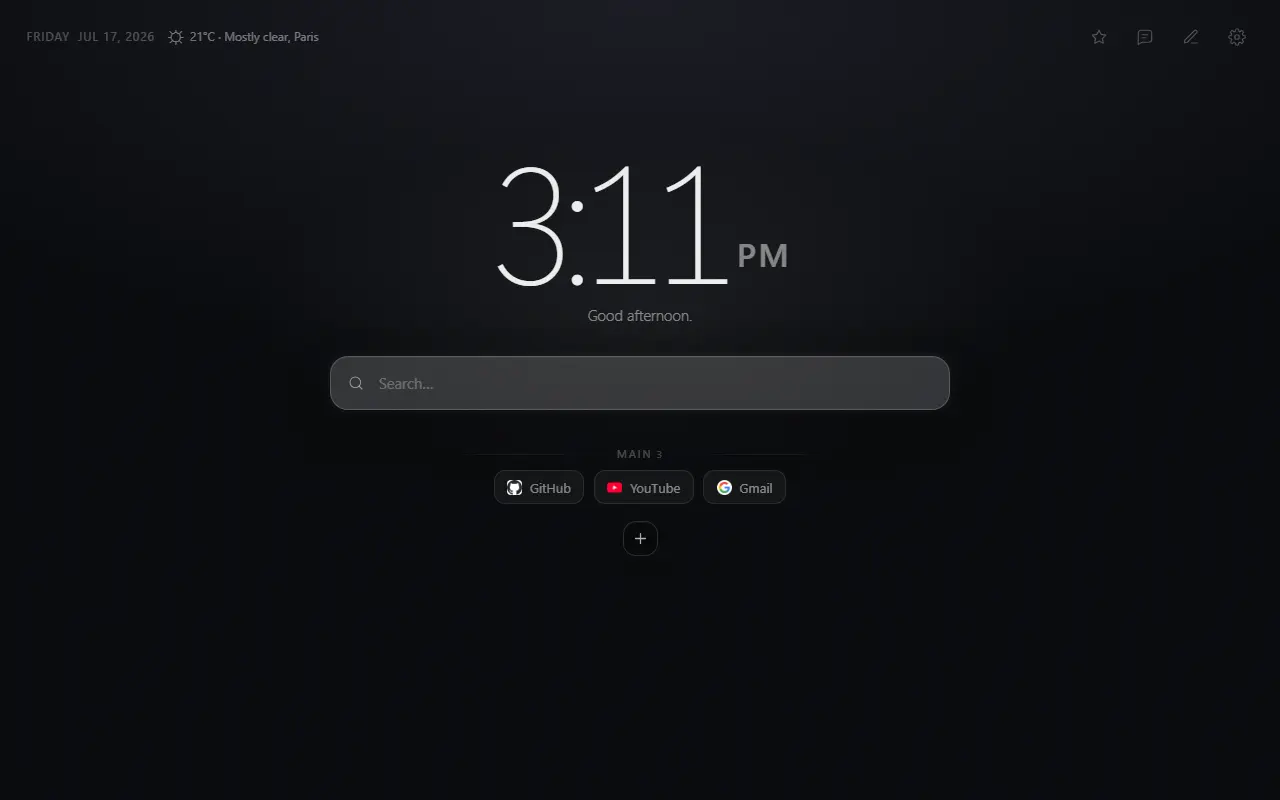
Mist — Minimal New Tab replaces Chrome’s default page with a quiet, fast start page for search, shortcuts, time and optional weather. Add only what earns its place.
The problem
Minimal should mean deliberate, not empty
A new tab appears dozens of times during an ordinary browsing day. When it is crowded with feeds, tasks and promotional modules, that repeated interruption becomes noise. An entirely blank page solves the noise but removes the shortcuts and orientation that make a start page useful.
The useful middle ground is a small set of predictable tools: the current time, the browser search you already use and links you chose yourself. Everything else should be optional.
Direct answer
What a good minimalist new tab should do
It should open quickly, make the next action obvious and avoid competing for attention. Mist starts with a restrained dark layout and lets you hide the clock, search, shortcuts or weather independently.
Your shortcut groups and visual preferences remain in browser storage. You can export them as JSON when you want a backup. There is no account, advertising feed or analytics profile.
Why it helps
Benefits tied to this use case
Less visual interruption
A stable layout and restrained controls keep attention on the destination you meant to open.
Useful at first glance
Search, time and chosen sites remain available without turning the page into a planner.
Atmosphere when wanted
Stay with a lightweight color theme, choose one of five illustrated themes or create a custom theme from your own image.
How it works
Build the page in deliberate steps
- 01
Install from the Chrome Web Store
Chrome asks you to confirm the extension. Mist then becomes the page shown for new tabs.
- 02
Remove what you do not use
Hide weather, search, shortcuts or the clock independently from Settings.
- 03
Arrange a short list of destinations
Create groups and drag shortcuts into an order that matches your routine.
Concrete situations
Where this setup earns its place
A clean browsing reset
Use the new tab as a brief visual pause between one site and the next.
A small daily launchpad
Keep a few frequent sites visible while leaving occasional destinations to search or bookmarks.
A consistent personal space
Choose a calm color or illustrated atmosphere without changing how the page works.
Available in Mist now
Features relevant to this page
- Local shortcut groups
- Add, edit, remove and reorder links. Groups help separate destinations without adding nested menus.
- Browser-default search
- Mist sends a query through Chrome’s configured search engine rather than maintaining a separate search account.
- Optional daily information
- A clock, date, greeting and weather display can each support orientation without becoming a feed.
- Import and export
- Download shortcuts or the full configuration as JSON and restore them from a file you control.
Limitations and trade-offs
What to know before installing
Mist is currently published for desktop Chrome. Edge and Firefox versions are planned, not available. Chrome extensions cannot replace the new-tab page in an Incognito window.
Optional weather makes documented third-party requests after consent. Shortcut icons stay local, so a fresh page remains offline when weather is disabled.
An honest comparison
Mist compared with a blank or default Chrome tab
A blank page provides maximum visual quiet but no chosen destinations. Chrome’s default page offers shortcuts, a background and Google-connected customization, but its available controls depend on the default search engine and sign-in state.
Mist is for people who want more shortcut organization and display control while keeping the page narrower than a full productivity dashboard.
Specific answers
Questions people ask before choosing
Can I make Mist almost blank?
Yes. The clock, search, shortcuts and weather can be hidden independently. You can keep a simple color theme and only the elements you use.
Does Mist add tasks, news or motivational quotes?
No. Mist intentionally focuses on search, shortcuts, time, themes and optional weather rather than a general productivity feed.
Are the illustrated themes required?
No. Five lightweight base color themes are available, and the illustrated themes are optional.
Will my shortcut setup require an account?
No. The setup remains in Chrome extension storage. You can create a portable JSON backup yourself.